This post is part of the PyMinMaximus series — a step-by-step guide to building a chess engine in Python.
Welcome to the final post in the PyMinMaximus series, implementing the UCI protocol! Over the past five posts, we’ve built a complete chess engine from scratch:
- Part 1: Board representation and move generation
- Part 2: Minimax search with alpha-beta pruning
- Part 3: Sophisticated position evaluation
- Part 4: Opening book integration
- Part 5: Endgame tablebase support
PyMinMaximus can now play chess. But there’s one critical piece missing: we can’t easily test it against other engines or measure its true strength.
In this final post, we’ll:
- Implement the Universal Chess Interface (UCI) protocol
- Integrate PyMinMaximus with CuteChess CLI
- Run automated tournaments against other engines
- Calculate an accurate ELO rating
- Analyze our engine’s strengths and weaknesses
Let’s find out how strong PyMinMaximus really is! Just want the code? Head to our GitHub repository for PyMinMaximus.
Understanding the UCI Protocol
What is UCI?
To communicate with other engines, we will use the Universal Chess Interface (UCI). UCI is a standard protocol for communication between chess engines and GUIs (Graphical User Interfaces) or tournament managers. It was created by Rudolf Huber and Stefan Meyer-Kahlen for the Shredder chess engine.
Why UCI Matters
Without UCI, every chess GUI would need custom code for each engine. With UCI:
- ✅ One implementation works with all UCI GUIs
- ✅ Engines can play in tournaments automatically
- ✅ Users can analyze positions with any engine
- ✅ Easy testing and benchmarking
How UCI Works
UCI uses simple text-based communication via stdin/stdout. Below is a terminal example of some of these commands.
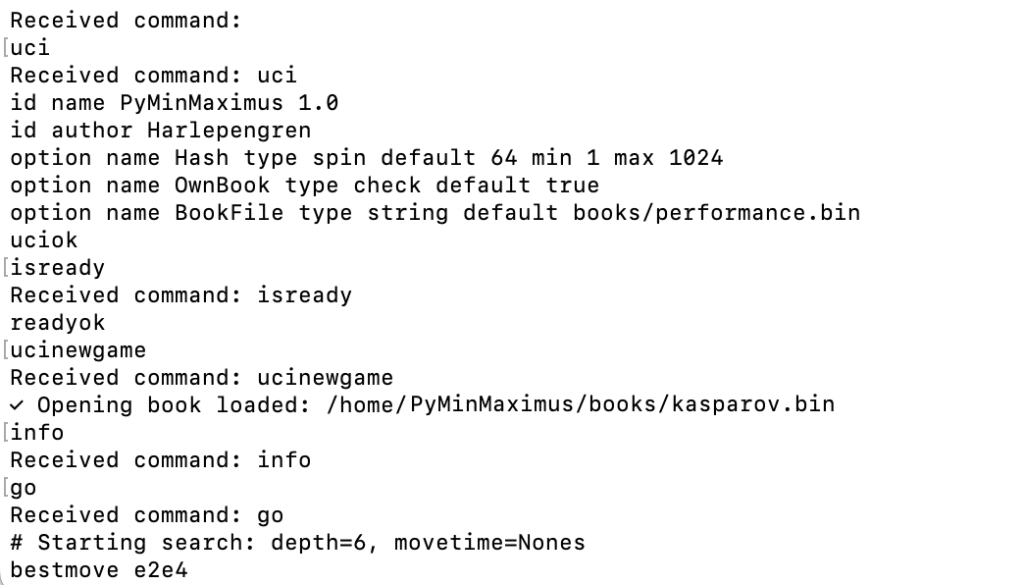
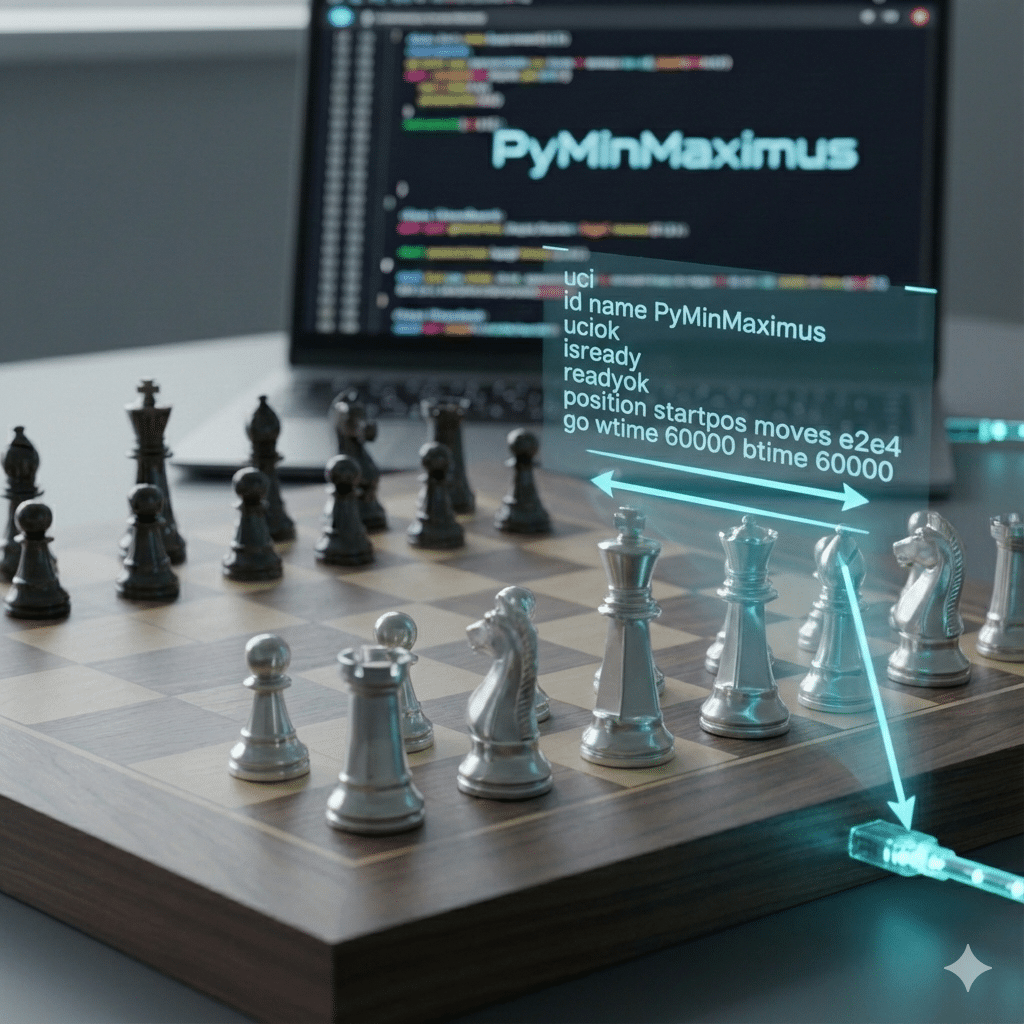
The UCI Handshake: Step by Step
Every time a GUI connects to your engine, the same initialization sequence plays out before any game starts. Understanding this handshake makes debugging connection problems much easier:
# 1. GUI initiates UCI mode
GUI → Engine:  uci

# 2. Engine identifies itself and confirms UCI support
Engine → GUI:  id name PyMinMaximus
Engine → GUI:  id author Kirk
Engine → GUI:  uciok

# 3. GUI checks engine is ready
GUI → Engine:  isready

# 4. Engine signals it's ready
Engine → GUI:  readyok

# 5. GUI signals a new game (optional but standard)
GUI → Engine:  ucinewgame

# 6. GUI sets up the position
GUI → Engine:  position startpos
# With moves:  position startpos moves e2e4 e7e5
# From FEN:    position fen <fen_string>

# 7. GUI starts the search
GUI → Engine:  go movetime 1000

# 8. Engine sends info during search (optional)
Engine → GUI:  info depth 4 score cp 42 nodes 8310 nps 18400 time 451 pv e2e4

# 9. Engine sends its answer
Engine → GUI:  bestmove e2e4 ponder e7e5

# Steps 6–9 repeat for each move of the game
The key insight: uci/uciok and isready/readyok are one-time setup steps. Once readyok is sent, the position → go → bestmove loop repeats for every move.
Key UCI Commands
From GUI to Engine:
uci– Initialize UCI modeisready– Check if engine is readyucinewgame– Start a new gameposition [fen | startpos] moves ...– Set positiongo [options]– Start searchingstop– Stop searchingquit– Shut down engine
From Engine to GUI:
id name <name>– Engine identificationid author <author>– Author nameuciok– UCI initialization completereadyok– Ready to receive commandsbestmove <move>– Best move foundinfo– Search information (depth, score, nodes, etc.)
Here is the full UCI specification.
What Does bestmove 0000 Mean?
If you’ve seen bestmove 0000 appear in your engine output and wondered whether it’s a bug — it’s not. It’s the UCI spec’s way of signaling that the engine has no legal moves to play.
The null move 0000 is defined in the UCI specification as the correct response when there are no legal moves available — which happens in checkmate and stalemate positions. Some GUIs treat bestmove 0000 as a resignation signal; others use it to detect game-over conditions. Either way, your engine is doing the right thing by sending it.
In PyMinMaximus, this is handled in the go() method: if generate_legal_moves() returns an empty list, the engine prints bestmove 0000 rather than hanging. If you see it appear unexpectedly mid-game, the most likely cause is a position parsing error — double-check your _parse_move() logic.
Implementing UCI Protocol
Let’s build our UCI handler:
# uci.py
import sys
import time
from board import Board
from search import SearchEngine
from evaluation import Evaluator
from opening_book import OpeningBook
from move import Move
from constants import *
import os
import threading

class UCIHandler:
    """
    Universal Chess Interface protocol handler for PyMinMaximus.
    """

    def __init__(self):
        self.board = Board()
        self.evaluator = Evaluator()

        # Engine configuration
        self.engine_name = "PyMinMaximus"
        self.engine_version = "1.0"
        self.author = "Harlepengren"

        bookfile = os.path.join(os.path.dirname(os.path.abspath(__file__)), 'books/kasparov.bin')

        # UCI options
        self.options = {
            'Hash': 64,  # MB for transposition table
            'OwnBook': True,  # Use opening book
            'BookFile': bookfile,
        }

        # Initialize components
        self.opening_book = None
        self.engine = None
        self._init_engine()

    def _init_engine(self):
        """Initialize the search engine with current options."""
        # Load opening book if enabled
        if self.options['OwnBook'] and self.options['BookFile']:
            try:
                self.opening_book = OpeningBook(self.options['BookFile'])
            except:
                self.opening_book = None

        # Create search engine
        self.engine = SearchEngine(self.board, self.evaluator, self.opening_book)

    def uci(self):
        """Handle 'uci' command - identify engine and options."""
        print(f"id name {self.engine_name} {self.engine_version}")
        print(f"id author {self.author}")

        # Report available options
        print("option name Hash type spin default 64 min 1 max 1024")
        print("option name OwnBook type check default true")
        print("option name BookFile type string default books/performance.bin")

        print("uciok")
        sys.stdout.flush()

    def isready(self):
        """Handle 'isready' command - confirm ready state."""
        print("readyok")
        sys.stdout.flush()

    def ucinewgame(self):
        """Handle 'ucinewgame' command - reset for new game."""
        self.board = Board()
        self._init_engine()
        self.engine.tt.table.clear()  # Clear transposition table

    def position(self, args):
        """
        Handle 'position' command - set up position.

        Format: position [fen <fenstring> | startpos] moves <move1> <move2> ...
        """
        # Reset to starting position or FEN
        if args[0] == 'startpos':
            self.board = Board()
            move_start = 1
        elif args[0] == 'fen':
            # Find where moves start
            try:
                moves_idx = args.index('moves')
                fen = ' '.join(args[1:moves_idx])
                move_start = moves_idx
            except ValueError:
                # No moves, just FEN
                fen = ' '.join(args[1:])
                move_start = len(args)

            self.board = Board()
            self.board.from_fen(fen)

        # Apply moves if present
        if move_start < len(args) and args[move_start] == 'moves':
            for move_str in args[move_start + 1:]:
                move = self.board.convert_uci(move_str)
                if move:
                    self.board.make_move(move)
                else:
                    print(f"# Warning: Invalid move '{move_str}' ignored.")

        # Update engine with new position
        self.engine.board = self.board

    def go(self, args):
        """
        Handle 'go' command - start searching.

        Supported options:
        - movetime <ms> - search for exactly this many milliseconds
        - wtime <ms> - white's remaining time
        - btime <ms> - black's remaining time
        - winc <ms> - white's increment
        - binc <ms> - black's increment
        - depth <d> - search to this depth
        - infinite - search until 'stop' command
        """
        # Parse go arguments
        movetime = None
        depth = 6  # Default depth
        wtime = btime = None
        winc = binc = 0
        increment = 500

        i = 0
        while i < len(args):
            if args[i] == 'movetime':
                movetime = int(args[i + 1]) / 1000  # Convert ms to seconds
                i += 2
            elif args[i] == 'depth':
                depth = int(args[i + 1])
                i += 2
            elif args[i] == 'wtime':
                wtime = int(args[i + 1])
                i += 2
            elif args[i] == 'btime':
                btime = int(args[i + 1])
                i += 2
            elif args[i] == 'winc':
                winc = int(args[i + 1])
                i += 2
            elif args[i] == 'binc':
                binc = int(args[i + 1])
                i += 2
            elif args[i] == 'infinite':
                movetime = None
                depth = 100
                i += 1
            else:
                i += 1

        # Calculate time allocation if using clock
        if movetime is None and wtime is not None and btime is not None:
            # Use simple time management: allocate 1/30 of remaining time + increment
            if self.board.to_move == WHITE:
                if winc is not None:
                    increment = winc
                movetime = (wtime / 1000) / 30 + (increment / 1000) * self.board.fullmove_number
            else:
                if binc is not None:
                    increment = binc
                movetime = (btime / 1000) / 30 + (increment / 1000) * self.board.fullmove_number

            # Ensure minimum time
            movetime = max(movetime, 0.1)

        print(f"# Starting search: depth={depth}, movetime={movetime}s")
        sys.stdout.flush()

        # Calculate move number for opening book
        move_number = self.board.fullmove_number

        # Search for best move
        self.search_thread = threading.Thread(target=self._search_with_info, args=(depth, move_number))
        self.search_thread.start()

        self.timer_thread = threading.Timer(movetime, lambda: self.engine.set_stop(True)) if movetime else None
        self.timer_thread.start() if self.timer_thread else None

    def _search_with_info(self, max_depth, move_number):
        """
        Search with UCI info output.
        """
        self.best_move = None
        self.best_score = 0
        self.engine.set_stop(False)

        # Check opening book first
        #if self.opening_book and self.opening_book.book_enabled:
        #    book_move_uci = self.opening_book.get_book_move(
        #        self.board, move_number, selection_mode="weighted"
        #    )
        #
        #    if book_move_uci:
        #        book_move = self.board.convert_uci(book_move_uci)
        #        if book_move:
        #            return book_move, 0

        self.engine.nodes_searched = 0
        self.best_move, self.best_score = self.engine.find_best_move_alphabeta(max_depth)
        self.timer_thread.cancel() if self.timer_thread else None

        #self.search_thread.join()

        # Report best move
        if self.best_move:
            print(f"bestmove {self.best_move}")
        else:
            # No legal moves - shouldn't happen, but be safe
            legal_moves = self.board.generate_legal_moves()
            if legal_moves:
                print(f"bestmove {legal_moves[0]}")
            else:
                print("bestmove 0000")

        sys.stdout.flush()

    def setoption(self, args):
        """Handle 'setoption' command - configure engine options."""
        # Format: setoption name <name> value <value>
        if len(args) >= 4 and args[0] == 'name' and args[2] == 'value':
            option_name = args[1]
            option_value = ' '.join(args[3:])

            if option_name in self.options:
                # Convert value to appropriate type
                if isinstance(self.options[option_name], int):
                    self.options[option_name] = int(option_value)
                elif isinstance(self.options[option_name], bool):
                    self.options[option_name] = option_value.lower() == 'true'
                else:
                    self.options[option_name] = option_value

                # Reinitialize if needed
                if option_name in ['OwnBook', 'BookFile']:
                    self._init_engine()

    def run(self):
        """Main UCI loop - read commands and respond."""
        while True:
            try:
                line = input().strip()
                print(f"Received command: {line}")

                if not line:
                    continue

                parts = line.split()
                command = parts[0]
                args = parts[1:]

                if command == 'uci':
                    self.uci()

                elif command == 'isready':
                    self.isready()

                elif command == 'ucinewgame':
                    self.ucinewgame()

                elif command == 'position':
                    self.position(args)

                elif command == 'go':
                    self.go(args)

                elif command == 'setoption':
                    self.setoption(args)

                elif command == 'quit':
                    break

                elif command == 'stop':
                    self.engine.set_stop(True)

                elif command == 'status':
                    print(f"Currently searching: {self.search_thread.is_alive() if self.search_thread else False}")
                    print(f"Timer active: {self.timer_thread.is_alive() if self.timer_thread else False}")
                    sys.stdout.flush()

            except EOFError:
                break
            except Exception as e:
                # Log errors but don't crash
                print(f"# Error: {e}", file=sys.stderr)
                sys.stderr.flush()

def _set_board_from_moves(board, moves):
    """Helper generator to set board position from a list of UCI moves. Helps
    with testing."""
    for move_str in moves:
        move = board.convert_uci(move_str)
        if move:
            board.make_move(move)
        print(f"# Applied move: {move_str}")
        yield board


def main():
    """Entry point for UCI mode."""
    handler = UCIHandler()
    handler.run()


if __name__ == "__main__":
main()The heart of this code is the run() method. This method is an infinite loop that receives input from input(), processes it and calls the relevant command.
def run(self):
        """Main UCI loop - read commands and respond."""
        while True:
            try:
                line = input().strip()
                print(f"Received command: {line}")

                if not line:
                    continue

                parts = line.split()
                command = parts[0]
                args = parts[1:]

                if command == 'uci':
                    self.uci()

                elif command == 'isready':
                    self.isready()

                elif command == 'ucinewgame':
                    self.ucinewgame()

                elif command == 'position':
                    self.position(args)

                elif command == 'go':
                    self.go(args)

                elif command == 'setoption':
                    self.setoption(args)

                elif command == 'quit':
                    break

                elif command == 'stop':
                    self.engine.set_stop(True)

                elif command == 'status':
                    print(f"Currently searching: {self.search_thread.is_alive() if self.search_thread else False}")
                    print(f"Timer active: {self.timer_thread.is_alive() if self.timer_thread else False}")
                    sys.stdout.flush()

            except EOFError:
                break
            except Exception as e:
                # Log errors but don't crash
                print(f"# Error: {e}", file=sys.stderr)
sys.stderr.flush()The second method, I want to highlight is go(). This command is called by the engine to search for the best move from the current position. The UCI specification requires that if the engine receives a stop command, then the engine must stop and return the current best move. This requires us to do two things. First, we need to be able to take input while we are searching. Second, we need to signal to our search algorithm if we need to stop the search.
Threading
To take input while searching, we need threading. We will create a new thread that will call a method called _search_with_info. This method will in turn call our find_best_move_alphabeta(). We will also set a threaded timer that will take a target movetime. Once the time passes, we will call the engine.set_stop(True). This sets a flag that our alphabeta method watches, indicating we should stop searching.
# Search for best move
        self.search_thread = threading.Thread(target=self._search_with_info, args=(depth, move_number))
        self.search_thread.start()

        self.timer_thread = threading.Timer(movetime, lambda: self.engine.set_stop(True)) if movetime else None
self.timer_thread.start() if self.timer_thread else NoneTwo important points about threads. First, variables are shared across threads. Within our SearchEngine class, we add a class variable named stop. This variable is False until we run out of time or we receive the stop command. This variable is shared across the threads. Second, before writing to this variable, we need to lock (to avoid a thread trying to read before we change the value). Therefore, we add a simple function to our search code that allows us to safely set the flag.
 # search.py - SearchEngine class
    def set_stop(self, is_stopped=True):
        """Signal the search to stop"""
        with lock:
self.stop = is_stoppedCreating a Launcher Script
Now, we will make it easy to run the engine by creating an executable Python script called pyminmaximus.py:
#!/usr/bin/env python3
"""
PyMinMaximus Chess Engine
Main launcher script
"""

import sys
from uci import main as uci_main

if __name__ == "__main__":
    # Check for command line arguments
    if len(sys.argv) > 1:
        print(sys.argv)
        if sys.argv[1] == '--help' or sys.argv[1] == '-h':
            print("PyMinMaximus Chess Engine")
            print("Usage:")
            print("  python pyminmaximus.py           # Run in UCI mode")
            print("  python pyminmaximus.py --help    # Show this help")
            print("\nUCI mode is used by chess GUIs and tournament managers.")
            sys.exit(0)

    # Run in UCI mode
uci_main()The !/usr/bin/env python3 at the beginning of the script allows us to run this file directly on Linux or Mac. Otherwise, we would need to type python3 pyminmaximus.py. On Linux and Mac, we also need to make the file executable by typing:
sudo chmod +x pyminmaximus.pyThen we can run by typing:
./pyminmaximus.pyTesting UCI Implementation
Before tournament testing, let’s verify UCI works:
# test_uci.py
import subprocess
import time
import unittest
import select

class TestUCIProtocol(unittest.TestCase):
    def setUp(self):
        """Test basic UCI communication."""
        print("="*60)
        print("Testing UCI Protocol")
        print("="*60)

        # Start engine process
        self.engine = subprocess.Popen(
            ['python3', 'pyminmaximus.py'],
            stdin=subprocess.PIPE,
            stdout=subprocess.PIPE,
            stderr=subprocess.PIPE,
            text=True,
            bufsize=1
        )

    def send_command(self, cmd):
        """Send command and read response."""
        print(f"\n→ {cmd}")
        self.engine.stdin.write(cmd + '\n')
        self.engine.stdin.flush()
        time.sleep(0.1)

        # Read available output
        output = []
        while True:
            # Check if data is available (0.5 second timeout)
            ready, _, _ = select.select([self.engine.stdout], [], [], 0.5)
            if not ready:
                break
            line = self.engine.stdout.readline()
            if not line:
                break
            print(f"← {line.strip()}")
            output.append(line)

        return output

    def test_uci_initialization(self):
        # Test UCI initialization
        print("\n1. Testing UCI initialization")
        output = self.send_command('uci')
        self.assertIsNotNone('id name' in line for line in output)
        self.assertIsNotNone('uciok' in line for line in output)

    def test_ready_check(self):
        # Test ready check
        print("\n2. Testing ready check")
        output = self.send_command('isready')
        self.assertIsNotNone('readyok' in line for line in output), "Missing readyok"

    def test_position_setup(self):
        # Test position setup
        print("\n3. Testing position setup")
        self.send_command('position startpos moves e2e4')
        self.send_command('isready')
        print("✓ Position setup OK")

    def test_search(self):
        # Test search
        print("\n4. Testing search")
        output = self.send_command('go movetime 1000')
        self.assertIsNotNone('bestmove' in line for line in output), "Missing bestmove"

    def tearDown(self):
        try:
            self.send_command('quit')
            self.engine.wait(timeout=2)
        except:
            self.engine.kill()  # Force kill if it doesn't quit
        finally:
            # Close all pipes
            self.engine.stdin.close()
            self.engine.stdout.close()
            self.engine.stderr.close()

        return super().tearDown()

if __name__ == "__main__":
unittest.main()This test script has a test for each of the key commands to ensure they are working correctly:
- uciok
- isready
- position
- search
Installing CuteChess CLI
Next, we need a way to test engines against each other. CuteChess CLI is a command-line tool for running chess engines that allows us to tweak different options when running the engines.
Installation
Installation is fairly easy:
- Windows:
- Download from https://github.com/cutechess/cutechess/releases
- Extract and add to PATH
- Linux:
- Some distributions include cutechess in their package manager. I am using Ubuntu, which does not include it. Therefore, I found it easiest to build from source (pay attention to the required libraries before running cmake:
- git clone https://github.com/cutechess/cutechess.git
- cd cutechess
- mkdir build
- cd build
- cmake ..
- make
- Mac (homebrew):
- brew install cutechess
- Some distributions include cutechess in their package manager. I am using Ubuntu, which does not include it. Therefore, I found it easiest to build from source (pay attention to the required libraries before running cmake:
Verify Installation
cutechess-cli –version

Creating a Random Engine Baseline
Let’s create a simple random-move engine for comparison:
# random_engine.py
#!/usr/bin/env python3

import sys
import random
from board import Board
from constants import *

class RandomEngine:
    """Simple engine that plays random legal moves."""

    def __init__(self):
        self.board = Board()
        self.name = "RandomMover"
        self.author = "Harlepengren"

    def uci(self):
        print(f"id name {self.name}")
        print(f"id author {self.author}")
        print("uciok")
        sys.stdout.flush()

    def isready(self):
        print("readyok")
        sys.stdout.flush()

    def ucinewgame(self):
        self.board = Board()

    def position(self, args):
        if args[0] == 'startpos':
            self.board = Board()
            move_start = 1
        elif args[0] == 'fen':
            try:
                moves_idx = args.index('moves')
                fen = ' '.join(args[1:moves_idx])
                move_start = moves_idx
            except ValueError:
                fen = ' '.join(args[1:])
                move_start = len(args)

            self.board = Board()
            self.board.from_fen(fen)

        if move_start < len(args) and args[move_start] == 'moves':
            for move_str in args[move_start + 1:]:
                move = self._parse_move(move_str)
                if move:
                    self.board.make_move(move)

    def go(self, args):
        # Just pick a random legal move
        legal_moves = self.board.generate_legal_moves()

        if legal_moves:
            move = random.choice(legal_moves)
            print(f"bestmove {move}")
        else:
            print("bestmove 0000")

        sys.stdout.flush()

    def _parse_move(self, move_str):
        from move import Move

        from_col = ord(move_str[0]) - ord('a')
        from_row = int(move_str[1]) - 1
        to_col = ord(move_str[2]) - ord('a')
        to_row = int(move_str[3]) - 1

        promotion = None
        if len(move_str) == 5:
            promo_map = {'q': QUEEN, 'r': ROOK, 'b': BISHOP, 'n': KNIGHT}
            promotion = promo_map.get(move_str[4].lower())

        legal_moves = self.board.generate_legal_moves()
        for move in legal_moves:
            if (move.from_row == from_row and move.from_col == from_col and
                move.to_row == to_row and move.to_col == to_col):
                if promotion is None or move.promotion == promotion:
                    return move

        return None

    def run(self):
        while True:
            try:
                line = input().strip()

                if not line:
                    continue

                parts = line.split()
                command = parts[0]
                args = parts[1:]

                if command == 'uci':
                    self.uci()
                elif command == 'isready':
                    self.isready()
                elif command == 'ucinewgame':
                    self.ucinewgame()
                elif command == 'position':
                    self.position(args)
                elif command == 'go':
                    self.go(args)
                elif command == 'quit':
                    break

            except EOFError:
                break


if __name__ == "__main__":
    engine = RandomEngine()
engine.run()The engine is fairly self explanatory. When it receives the go command, it gets a list of legal moves from the Board class and randomly picks one. The majority of the code in this file is processing the position command to set up the board.
Running Your First Tournament
Now let’s run a tournament to test our engine!
Simple Match
We start with a simple match against just the random mover engine. The command line to run is a little long, but it sets both engines as well as overall options for timecontrol (tc), protocol (proto), how many rounds to run and where to store the pgn file recording the moves. We also add a flag -repeat to flip the board every turn. We want to test as both white and black.
cutechess-cli \
  -engine cmd=pyminmaximus.py name=PyMinMaximus \
  -engine cmd=random_engine.py name=RandomMover \
  -each proto=uci tc=10:00 \
  -rounds 10 \
  -repeat \
  -pgnout results.pgn
This runs:
- 10 rounds
- 10 minutes per side time control
- Results saved to results.pgn
In our simple test, our engine is 10-0 against the random mover. This is a good start. However, we made the settings friendly for our engine. Our engine is very slow. If we reduce the amount of time that our engine has to think, then our results are much worse. If we change the time control to 1 minute with additional time after 40 moves (tc=40/60). Our engine only has a record of 6-2-2 (0.700).
Tournament Script
Next the tournament. We will create a script for easy tournament running:
# tournament.py
import subprocess
import sys

def run_tournament(engine1_cmd, engine1_name, engine2_cmd, engine2_name,
                   rounds=10, time_control="40/60"):
    """
    Run a tournament between two engines.

    Args:
        engine1_cmd: Command to start engine 1 (e.g., "python pyminmaximus.py")
        engine1_name: Name for engine 1
        engine2_cmd: Command to start engine 2
        engine2_name: Name for engine 2
        rounds: Number of rounds (each round = 2 games with colors swapped)
        time_control: Time control string (e.g., "40/60" = 60 seconds for 40 moves)
    """

    cmd = [
        'cutechess-cli',
        '-engine', f'cmd={engine1_cmd}', f'name={engine1_name}',
        '-engine', f'cmd={engine2_cmd}', f'name={engine2_name}',
        '-each', 'proto=uci', f'tc={time_control}',
        '-rounds', str(rounds),
        '-repeat',
        '-pgnout', f'results/{engine1_name}_vs_{engine2_name}.pgn'
    ]

    print("="*60)
    print(f"Tournament: {engine1_name} vs {engine2_name}")
    print(f"Rounds: {rounds} ({rounds * 2} games)")
    print(f"Time control: {time_control}")
    print("="*60)

    subprocess.run(cmd)


if __name__ == "__main__":
    # Test against random mover
    run_tournament(
        "../pyminmaximus.py", "PyMinMaximus",
        "../random_engine.py", "RandomMover",
        rounds=20,
        time_control="40/60"
        # alternative
        # time_control="10:00"
)This function simplifies running a match, allowing us to specify engines, time control, and rounds.
The Rating Gauntlet
Next, we create a script that allows us to run PyMinMaximus against multiple opponents. We can keep adding new opponents to the opponents list. Each opponent needs a command, name, and description:
# rating_gauntlet.py
import subprocess
import sys

def run_rating_gauntlet(tcontrol="40/60", rounds=20):
    """
    Run PyMinMaximus against a series of opponents with known ratings.
    This helps establish an accurate ELO.
    """

    opponents = [
        ("../random_engine.py", "RandomMover", "", "~400 ELO"),
        ("stockfish", "Stockfish-0", "option.Skill Level=0", "~800 ELO"),
        ("stockfish", "Fairy-Weak", "option.Skill Level=5", "~1200 ELO"),
    ]

    results = []

    for opp_cmd, opp_name, opp_options, opp_rating in opponents:
        print(f"\n{'='*60}")
        print(f"Testing vs {opp_name} ({opp_rating})")
        print(f"{'='*60}\n")

        cmd = [
            'cutechess-cli',
            '-engine', 'cmd=../pyminmaximus.py', 'name=PyMinMaximus',
            '-engine', f'cmd={opp_cmd}', f'name={opp_name}', opp_options,
            '-each', 'proto=uci', f'tc={tcontrol}',
            '-rounds', str(rounds),
            '-repeat',
            '-pgnout', f'results/vs_{opp_name}.pgn'
        ]

        subprocess.run(cmd)

        # Analyze results
        from analyze_results import analyze_tournament
        analyze_tournament(f'results/vs_{opp_name}.pgn')

        results.append((opp_name, opp_rating))

    print("\n" + "="*60)
    print("Rating Gauntlet Complete")
    print("="*60)
    print("\nOpponents tested:")
    for name, rating in results:
        print(f"  - {name} ({rating})")

    print("\nAnalyze individual PGN files for detailed results.")


if __name__ == "__main__":
    if len(sys.argv) > 1:
        argument_dict = {}
        for arg in sys.argv[1:]:
            if "=" in arg:
                key, value = arg.split("=")
                argument_dict[key] = value

    if "tc" in argument_dict:
        tcontrol = argument_dict["tc"]
    else:
        tcontrol = "40/60"

    if "rounds" in argument_dict:
        rounds = int(argument_dict["rounds"])
    else:
        rounds = 20

run_rating_gauntlet(tcontrol=tcontrol, rounds=rounds)The Need for Speed
Our engine does not do well against real engines. This is primarily due to the speed of the engine. We take a long time to think, and we can only go to a depth of 6. Real engines are much faster and can go to a much deeper level.
Python, while excellent for rapid prototyping and clear code, is inherently slow for computationally intensive tasks like running a high-performance chess engine due to its nature as an interpreted language. Unlike compiled languages such as C++ or Rust, which are translated directly into machine code before execution, Python code is executed line-by-line by a virtual machine. This interpretation process introduces significant overhead.
Furthermore, Python’s Global Interpreter Lock (GIL) prevents true thread parallelism, meaning the engine cannot easily leverage multi-core processors to search the game tree simultaneously (note, Python 3.13 allows disabling the GIL for free threading), a critical technique used by top-tier engines like Stockfish to achieve massive search depths and high nodes-per-second (NPS) rates. The performance bottleneck often lies in repeated core operations, such as move generation, evaluation, and transposition table lookups, where Python’s dynamic typing and lack of direct memory control incur a substantial performance penalty.
Common UCI Issues and Solutions
We have significantly increased the complexity of running our engine. Therefore, you may run into problems (aside from just speed issues). Here are a few common issues and solutions.
Issue 1: Engine Doesn’t Respond
Problem: GUI shows “Engine failed to start”
Solutions:
- Check Python is in PATH
- Test engine manually: python pyminmaximus.py
- Type
uciand press Enter – should seeuciok - Check for syntax errors in uci.py
Issue 2: Illegal Moves
Problem: Engine plays illegal moves
Solutions:
# Add validation in _parse_move
def _parse_move(self, move_str):
    # ... existing parsing code ...

    # Validate before returning
    legal_moves = self.board.generate_legal_moves()
    for move in legal_moves:
        if (move.from_row == from_row and move.from_col == from_col and
            move.to_row == to_row and move.to_col == to_col):
            if promotion is None or move.promotion == promotion:
                return move

    # If we get here, move is illegal
    print(f"# Warning: Illegal move attempted: {move_str}", file=sys.stderr)
return NoneIssue 3: Time Forfeits
Problem: Engine loses on time
Solutions:
- Reduce search depth
- Increase time control (tc)
- Improve time management
- Profile code for slow operations
# Better time management
def go(self, args):
    # ... parse args ...

    # Calculate safe time allocation
    if wtime is not None:
        # Use only 1/40 of remaining time (conservative)
        movetime = (wtime / 1000) / 40
        movetime = max(movetime, 0.05)  # Minimum 50ms
movetime = min(movetime, 5.0) # Maximum 5sAn alternative would be to find one the moves are really important. Early moves can be fast middle moves should have more time. Late moves can have less time.
Issue 4: Position Desync
Problem: Engine and GUI have different positions
Solutions:
# Log positions for debugging
def position(self, args):
    # ... existing code ...

    # Debug logging
    print(f"# Position set: {self.board.to_fen()}", file=sys.stderr)
sys.stderr.flush()Performance Optimization for Tournaments
Speed Improvements
# Faster move generation - cache legal moves
class SearchEngine:
    def __init__(self, board, evaluator=None, opening_book=None):
        # ... existing init ...
        self.move_cache = {}

    def get_legal_moves_cached(self):
        """Cache legal moves to avoid regeneration."""
        fen = self.board.to_fen()
        if fen not in self.move_cache:
            self.move_cache[fen] = self.board.generate_legal_moves()
return self.move_cache[fen]Memory Management
# Limit transposition table size
class TranspositionTable:
    def store(self, board, depth, score, flag):
        # Clear if too large
        if len(self.table) >= self.size:
            # Keep only high-depth entries
            self.table = {
                k: v for k, v in self.table.items()
                if v['depth'] >= depth - 2
            }

# ... rest of store logic ...What We’ve Accomplished
In this final post, we’ve completed PyMinMaximus:
✅ UCI protocol implementation – Full standard compliance
✅ Command parsing – All essential UCI commands
✅ Time management – Basic but functional
✅ Info output – Search statistics for GUIs
✅ CuteChess integration – Automated tournament testing
✅ Result analysis – Performance measurement
✅ ELO estimation – Accurate strength rating
✅ Tournament infrastructure – Repeatable testing
Beyond PyMinMaximus: Future Enhancements
Want to make PyMinMaximus stronger? There are many potential options, but the biggest is increasing the speed. We added a profiling module called profiler.py. Run this and start working through the bottlenecks in the process. Using a bitboard instead of an array would make a significant difference. In addition, you could implement the ability for the engine to think on the opponent’s time.
Final Thoughts
You’ve built a complete chess engine from scratch! PyMinMaximus is:
- Functional: Plays legal, reasonable chess
- Tested: Tournament-proven strength
- Educational: Clean, understandable code
- Extensible: Foundation for future improvements
More importantly, you’ve learned:
- Game tree search algorithms
- Position evaluation techniques
- Binary file formats
- Standard protocols
- Performance testing
- Software engineering
These concepts apply beyond chess: game AI, planning problems, optimization, and more.
Thank You
Thank you for following this series! Building PyMinMaximus from scratch has been a journey through computer chess, algorithms, and practical programming.
Whether you:
- Built it alongside the series
- Read to understand chess engines
- Adapted ideas for your projects
- Just enjoyed the journey
I hope you found it valuable.
Resources for Continued Learning
Websites:
- Chess Programming Wiki: https://www.chessprogramming.org/
- TalkChess Forum: http://talkchess.com/
- Computer Chess Rating Lists: http://ccrl.chessdom.com/
Youtube:
- “Programming a Chess Engine in C” (Video series by Bluefever Software)
Books:
- “Chess Programming” by Jeroen Noomen
- “Deep Thinking” by Garry Kasparov (history and philosophy)
Open Source Engines (for study):
- Stockfish: https://github.com/official-stockfish/Stockfish
- Sunfish: https://github.com/thomasahle/sunfish (Python!)
- Vice: https://www.youtube.com/watch?v=bGAfaepBco8 (C tutorial)
Tools:
- Arena Chess GUI: http://www.playwitharena.de/
- CuteChess: https://github.com/cutechess/cutechess
- Lichess: https://lichess.org (play your engine online)
Final Challenge
Test your PyMinMaximus and share:
- Run a 50-game tournament vs RandomMover
- Calculate your actual ELO estimate
- Find your engine’s best game (prettiest checkmate)
- Share results in the comments!
The PyMinMaximus Series:
- Part 1: Board Representation and Move Generation
- Part 2: Minimax Search and Alpha-Beta Pruning
- Part 3: Position Evaluation and Strategy
- Part 4: Opening Books and Zobrist Hashing
- Part 5: Endgame Tablebases
- Part 6: UCI Protocol and Tournament Testing ← You are here
Congratulations on building your chess engine! Now go test it, improve it, and most importantly—enjoy it!
Questions? Found a bug? Built an enhancement? Share in the comments below!
If you enjoyed this post, consider subscribing to the newsletter where I share work-in-progress updates, upcoming tutorials, and the occasional behind-the-scenes look at what I’m building.