At 3:08 in the afternoon on July 20, 1969, with the Eagle lander 33,000 feet above the lunar surface and descending fast, an alarm went off.
The display on the guidance computer flashed 1202.
Nobody in the lander knew what it meant. Neil Armstrong called it down to Mission Control. Flight controllers started checking their notes. Twenty-six-year-old Jack Garman, a NASA engineer sitting at a back-room console in Houston, had a handwritten cheat sheet of alarm codes taped next to his station. He scanned it, found 1202, and recognized it immediately.
The computer was telling them it was overloaded.
And then — remarkably — it kept flying the lander anyway.
A Computer the Size of a Suitcase
The Apollo Guidance Computer was designed at MIT in the early 1960s, before integrated circuits were reliable enough to trust with human lives. The engineers at MIT’s Instrumentation Laboratory, led by Charles Stark Draper, essentially had to invent the discipline of real-time software as they went.
The finished machine weighed 70 pounds, drew 55 watts of power, and fit into a space roughly the size of a hardback dictionary. It had to navigate a spacecraft across 240,000 miles of vacuum, calculate orbital mechanics in real time, and control engine burns with enough precision to land two people on the Moon and bring them home.
To do all of this, it had just under 4 kilobytes of RAM.
Your phone’s camera takes photos that are thousands of times larger than that. A single emoji takes more memory than the AGC had available for all the variables in its entire guidance program. The computer that landed humans on the Moon had less working memory than a greeting card that plays “Happy Birthday.”
Two Kinds of Memory
The 4KB figure is actually just one part of the story — the erasable part. The AGC had two very different types of memory, and the distinction between them is crucial.
The working memory (4KB) was erasable core — magnetic rings that could be written and rewritten as the computer ran. This is where all the live data lived: current velocity, fuel remaining, the countdown timers, the numbers the astronauts entered on the keyboard. Everything the computer needed to track moment to moment.
The program itself — the actual software that ran the guidance, navigation, and control — lived somewhere else entirely: core rope memory, and there was about 72KB of it.
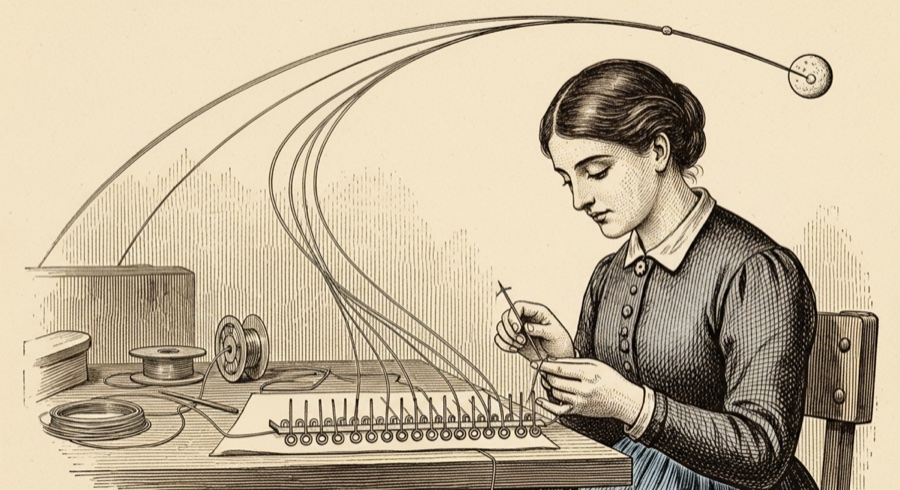
Core rope memory is one of the most tactile data storage technologies ever built. Information was encoded physically, by hand, by a team of women at a Raytheon factory in Waltham, Massachusetts. A thin wire was threaded through a small ferrite ring to represent a 1; bypassing the ring represented a 0. Bit by bit, the entire Apollo program was literally woven into loops of wire.
The women who did this work were called “LOL” by engineers — Little Old Ladies — a condescending nickname that obscures what they were actually doing: physically manufacturing software with needles and thread. Once a core rope was woven, it couldn’t be changed. You couldn’t patch a core rope memory the way you patch software today. If you found a bug after weaving, you started over.
This made the Apollo software team extraordinarily careful. It also made the final program extraordinarily compact.
The Software That Fit Inside
The person most responsible for making 72KB do the work of a mission-critical spaceflight system was Margaret Hamilton, who led the software development effort at MIT.
Hamilton’s team developed something they called priority scheduling — a system for managing the computer’s time that was far ahead of what most software engineers were doing in the 1960s. The basic problem was this: the AGC had to do many things at once. Navigate. Control the attitude thrusters. Process keyboard input from the astronauts. Track the rendezvous radar. Update the displays. And it had to do all of this on a single processor that could only run one instruction at a time.
The solution was to divide the software into jobs — discrete tasks with assigned priority levels. The most critical jobs (engine control, attitude control, guidance updates) ran at the highest priority. Less critical tasks (display updates, keyboard polling) ran at lower priority. If the computer got overwhelmed, it did exactly what you’d want: it kept doing the important things and dropped the unimportant things.
This is essentially how modern operating systems work. The AGC team built it by necessity, in the 1960s, in 72KB, for a machine that couldn’t be patched after launch.
Hamilton later described the approach as asynchronous software — the system could respond to events as they arrived rather than checking on each device in sequence. At the time, the term “software engineering” didn’t really exist as a discipline. Hamilton has said she pushed for the phrase deliberately, to give the work the same seriousness as hardware engineering.
The 1202 Alarm Explained
Back to that alarm.
When Eagle began its powered descent, the astronauts had left the rendezvous radar switched on. Whether it was an oversight or intentional is debated, but either way the computer hadn’t budgeted for it. The radar was feeding data into the computer, which the computer was dutifully trying to process. It was already running its full descent guidance program.
The 1202 alarm meant the computer’s scheduler had more jobs queued than it could handle. The task manager was overflowing.
What happened next is the part worth understanding. The AGC didn’t freeze. It didn’t crash. It didn’t start behaving unpredictably. It shed the low-priority tasks (radar processing, certain display updates) and kept running the high-priority jobs that were actually landing the spacecraft. The alarm was the computer telling the crew: I’m overwhelmed, I’m dropping some work, but I’m still flying. It fired five more times during the descent. Each time, the computer recovered.
Jack Garman in Houston recognized this from the alarm code and gave the go-ahead to continue. Flight Director Gene Kranz passed it on. Armstrong kept flying.
The priority scheduling system that Margaret Hamilton’s team built — designed precisely for a scenario where the computer was given more work than it could handle — saved the Apollo 11 landing.
What 4KB Actually Taught Us
The AGC’s constraints produced ideas that outlasted the Moon program by decades.
The distinction between fixed program storage (ROM) and working state (RAM) is now fundamental to how embedded computers work — microcontrollers in your thermostat, your car, your wireless headphones all use exactly this architecture. The AGC helped establish it.
Priority-based real-time scheduling became the basis for real-time operating systems — the software that runs in pacemakers, aircraft flight computers, and industrial controllers where missing a deadline isn’t a performance problem, it’s a safety failure.
And the discipline of writing software that had to be right the first time — because you couldn’t patch core rope memory after launch — gave the field a model of rigor it’s still reaching toward. Hamilton’s insistence that software engineering deserved the same methodological standards as bridge engineering turned out to be correct. The bridges that fail are usually the ones where someone decided the engineering was overkill.
Modern spacecraft don’t run on 4KB anymore. The computers aboard the International Space Station have gigabytes of RAM. But the guidance-critical systems still rely on the same principles and approach Hamilton’s team invented — and the habits of mind that came out of the Instrumentation Laboratory — check everything, assume nothing, design for failure — are still what you want in anything that has to work when there’s no one to reboot it.
A Curiosity to Pursue
The AGC source code was uploaded to GitHub in 2016 by a former NASA intern named Chris Garry, scanned from the original listings. It’s all there: the assembly language, the comments, the occasional joke left by engineers who knew only other engineers would ever read it. Search for “BURN_BABY_BURN” in the Luminary source to find a routine that fires the descent engine — a comment that made it into the code that went to the Moon.
If you want to go deeper, the Virtual AGC project has built a software emulator of the entire computer. You can run actual Apollo mission software on your laptop and enter VERB/NOUN commands on a simulated DSKY. There’s something genuinely moving about watching 1960s guidance code execute on hardware that didn’t exist when the software was written.